# OOJS - Object Oriented JavaScript - Part 2
In this part you'll understand object literal, encapsulation and use-case of objects.
*Hi! I am [Sunil](https://www.linkedin.com/in/linkinsunil/)! I am a front-end developer and this is the second part of 'OOJS - Object Oriented JavaScript' series. You can find the other parts of this series [here](https://linkinsunil.hashnode.dev/series/object-oriented-js-oojs).
For more useful content and articles, [follow me](https://twitter.com/intent/follow?original_referer=https%3A%2F%2Fgithub.com%2Flinkinsunil&screen_name=officialskv/ "linkinsunil - officialskv").*
This series will make you understand -
- Creating your own objects using object literal notation.
- Encapsulation, instances.
- JavaScript Classes and Constructors.
- Inheritance.
- Method Chaining.
- Prototypes and Prototype inheritance.
---
# OOJS - Object Oriented JavaScript - Part 2
In first part of this blog series we knew what is object, properties, values, methods, primitives. Now lets understand the easiest use-case of object. Lets make some background first-
```
OOJS - Object Oriented JavaScript
OOJS - Object Oriented JavaScript
```
Now, lets create some information about different users and also create some functions-
```
//create user one
var userOneEmail = 'sunilnet4@gmail.com';
var userOneName = 'Sunil';
var userOneFriends = 'Rekha';
//create user two
var userTwoEmail = 'kyle@gmail.com';
var userTwoName = 'Kyle';
var userTwoFriends = 'Simpson';
//create user three
var userThreeEmail = 'dan@gmail.com';
var userThreeName = 'Dan';
var userThreeFriends = 'Ambrov';
function login(email){
console.log(email, 'is now online');
}
function logout(email){
console.log(email, 'has logged out');
}
function logFriends(friends){
friends.forEach(friend => {
console.log(friend);
})
}
login(userOneEmail);
```
here above, we are making many different variables to store different user information. Then we have different functions for ```login```, ```logout``` and displaying ```friends```. But if there are more users and we keep coding like this, we'll soon start producing spaghetti code i.e, lot of unnecessary code will be all over the place. Ultimately we'll not have things together and nothing will be centralised.
When the code is small, you can manage this situation, but as you move on and the code starts to grow, things soon will become unmanageable and untidy.
To avoid this kind of situation, we can just wrap these in property and value format and assign them to a variable, an ```Object```. So lets get rid of the above code and start creating an object instead, storing all of the information above in that object-
```
var userOne = {
email: 'sunilnet4@gmail.com',
name : 'Sunil',
friends: 'Rekha',
login: function(){
console.log(this.email, 'has logged in');
},
logout(){
console.log(this.email, 'has logged out');
}
};
```
First, let me take you to what I just did above.
I have just wrapped all of the information of ```userOne``` in one object. This is called ```Encapsulation```. What encapsulation means is that any property or method or anything describing this particular will live inside this object. So anything that we're going to do with this user will be inside this object instead of multiple different variables.
I have declared a ```userOne``` object in object literal notation. Then I gave some properties to the userOne object such as ```email```, ```name```, ```friends```, ```login```, ```logout```.
Notice the syntax in which I declared ```login``` and ```logout``` functions. Both are correct ways, its just that the syntax of ```logout``` function is recently introduced in ES6. Now notice the ```this``` keyword. Here, ```this``` refers to the object it resides in. So in this case, it refers to the ```userOne``` object. If ```this``` was mentioned outside the ```userOne``` object, it would refer to the global object which, here, is the ```window``` object.
Now you can see the values of this ```userOne``` object for its different properties.
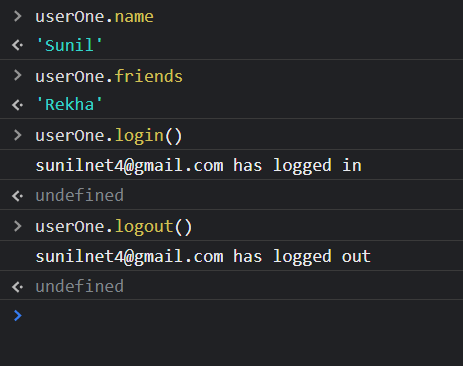
From this, we can conclude that, we can wrap everyting related to an object through encapsulation and apply properties, and methods to it meant for that object. Using object reduces spaghetti code, make the code looks neat and tidy ensuring better readability.
---
👉 In the next blog we'll perform more operations on objects further and will access its values from outside the object but before going away if you like this blog you can [tweet about it](https://twitter.com/intent/tweet?text=Object Oriented programming isn't considered easy but I think this blog article on Object Oriented JavaScript https://linkinsunil.hashnode.dev/ has made it super easy to understand and get going, give it a try. Thanks for the article, Sunil 🙌🏿.).
👉 Also, [connect with me on Linkedin](https://www.linkedin.com/in/linkinsunil/) to be the part of **15000+ members strong family of devs and tech recruiters**.
👉 If you're learning JavaScript and React, you can [follow me on Github](https://github.com/linkinsunil/) as an appreciation and star my repos if you find them useful.
👉 You can also subscribe to my [youtube channel](https://www.youtube.com/channel/UCU8n-kOWA4q2IClm5MGdI5Q?sub_confirmation=1) . I'll regularly post useful and some unique code and productivity targetting stuff here.
**Lets get things working, see you again. 🤘**